BLOOM | THESE DAYS | GWEN WRUCK

Hi Creative Friends,

Gwen with you on the blog today sharing for Cocoa Vanilla Studio. I have a new layout using the ‘These Days’ collection.  We are doing a bit of a Scrap-lift on the blog this week and I’m super excited to be inspired by a layout created by Laura Alberts.  I’ve included an image below of her layout so you can see all the inspiration I’ve had for my page.

There is so much about Laura’s page that inspires me.  I was first drawn to the frames in her background and their grid like format.  Then I was drawn to her black and white portrait image finished off with a striking black border on her layout.  For my layout, I simply started with those three elements and went from there.  I’ve pulled from my stash the same black and white pattern paper she has used for her outside edge (More than Words Collection – Gossamer) and then teamed it with the latest ‘These Days’ collection.  I’ve also found a black and white portrait photo to use, just as she has.  This one is a photo of me and I thought, why not use it, I don’t scrapbook myself nearly enough 🙂  I know I’m also going to use some butterfly embellishments just as she has in her page.

For the background of the layout, I’m using the ‘Home Grown’ pattern paper.  I love using pattern paper rather than card stock for my page backgrounds, this one is a pretty shade of yellow.  I’ve then pulled out a cut file from CUT to YOU, this one is a lovely mix of floral and frames called ‘Snap Shot with Florals‘.  I wanted to replicate the frames on Laura’s layout here.  I have gone ahead and backed the cut file using the A5 paper pad and then left the frames all open so that my lovely yellow background will show through.

Next, I’ve backed my photo and then fussy cut out a few of the pretty frames from the ‘Wall of Frame’ pattern paper.  I’m going to use these to layer into the frames in my cut file for something different.  This is a great way to give a bit of a backed look to the cut file, without the hard work.  The frames in this pattern paper are super quick to fussy cut out.  I’m using both of these elements taking inspiration from the frames in the background of Laura’s page.

I have positioned my photo to the left of the page so that you can see most of the floral elements in my cut file on the right.  From there, I’ve created three embellishment clusters using lots of elements from the collection.

I’ve featured elements from the ‘Die Cut Ephemera pack’ as well as florals from the ‘Floral Ephemera’ pack.  For the title of my page, I’m going with a sticker that says ‘Bloom where you are planted’ from the ‘Accessory Sticker Sheet’.  I’ve also used the typed sentiment stickers on the bottom of that sheet adding them to my page with foam tape for dimension.

To finish up the page, I’ve added in 3 of the ‘Wooden Buttons’ and they really help draw the eye around the layout as well as adding some lovely texture to the page.

I’ve also made a YouTube process video which you can watch here:

Thanks for popping by today, I hope you enjoyed seeing the details in my layout and that it has inspired you in some way 🙂

Until next time,

LOVING THE EVERYDAY | THESE DAYS | GWEN WRUCK

Hi Creative friends,

It’s Gwen and I’m back on the blog today sharing my very first layout using the stunning new ‘These Days’ collection.  The moment I saw this new collection I knew I’d love using it to document everyday moments of my family.  For this layout, I thought it would be fun to document my Miss 14 and her continued obsession with reading and her favourite book right now.

To begin my page, I’ve created my background using the ‘Family Ties’ and ‘Daybreak’ pattern papers.  I’ve also added some stitching around the edge for added detail.  I love using pattern papers for the backgrounds of my layouts and love this pretty green tone paper.

Next up, I’ve used the ‘Daybreak’ pattern paper to back a cut file from CUT to YOU as well as my photo.  This particular pattern paper is one of my favourites from the new collection.  I’ve popped the cut file onto foam tape for dimension and positioned onto my background along with the photo making sure everything is nice and straight with my T-square ruler.

For the embellishments for this layout, I have gone with a visual triangle, however, instead of the photo being inside the visual triangle, I have positioned my title inside of it.  The clusters I’ve built with similar elements including pieces from the ‘Die Cut Ephemera pack’ some ‘Wood Buttons’ and fussy cut out butterflies from the ‘Take Flight’ pattern paper.

I’ve also added some stickers from the ‘Accessory Sticker Sheet’ which I’ve mounted onto foam for dimension.  I love the sentiments that are included in this collection, perfect for sweet little family moments.  You’ll see each of my embellishment clusters has these elements in it, I find when I do this, it helps pull the page together.

I love the contrast of the white cut file shown here sitting onto of the background pattern paper.  You can also see here the elements of one of the embellishment clusters and my fussy cut butterfly.

If you would like to see how this page came together, I have a YouTube process video you can watch here:

If you haven’t seen the new collection in full yet, you can see my unboxing video here:

Thanks for popping by today,

SNAP SHOTS | UNFORGETTABLE | GWEN WRUCK

Hey Creative friends,

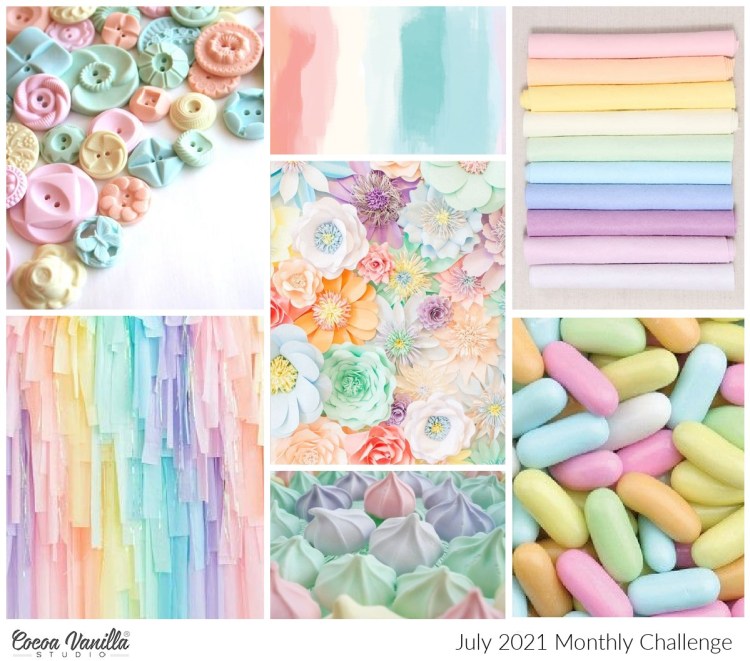
I’m back on the Cocoa Vanilla blog today with a new project to share.  For this one, I’m using this months mood-board as my inspiration to scrapbook a sweet picture of our pet cat.  I was really draw to the circular elements in the mood board for this layout especially as my photo has a large circular element in it.  For more details on how you can play along be sure to visit the Cocoa Vanilla Studio Facebook group.

Here is the mood-board, as I mentioned above, I was inspired by the circular elements in the top left hand corner photo.  I was also inspired by the top middle photo with the water colour paint in it, such pretty colour. I do hope you can see how the mood-board inspired me and how it helped me pull my page together.

To begin the layout, I pulled out this large circular cut file from CUT to YOU called ‘Burst Circles‘ and backed just the centre pieces.  

I’ve used a combination of papers from the collection for this, it was super quick to do and is a great option if you are new to working with cut file designs.  I’ve then created a frame for my layout background using the ‘Sprightly’ pattern paper, I’ve made sure to also use this pattern within my cut file to help pull the page together.  I love this particular pattern paper for this mood board because of it’s water-colour feel.  It also includes all of the colours I plan to use on my page so it will help to give the page a cohesive look.

I’ve then backed my photo in a pretty mint green pattern paper and stitched around the edge for added detail.  I don’t often work with circles, but I felt the circular elements in my photo were the perfect fit for the mood board and when I teamed them with the cut file and other circular pieces of the ephemera pack, they all work together to help tell the story of my photo.

There are a bunch of elements in the ‘Ephemera Packs’ in this collection, I’ve mixed and matched elements in size and shape, paying particular attention to include some of the circular elements.  I even had a couple of the wreath style elements (from several left over packs) so added them as background layers.

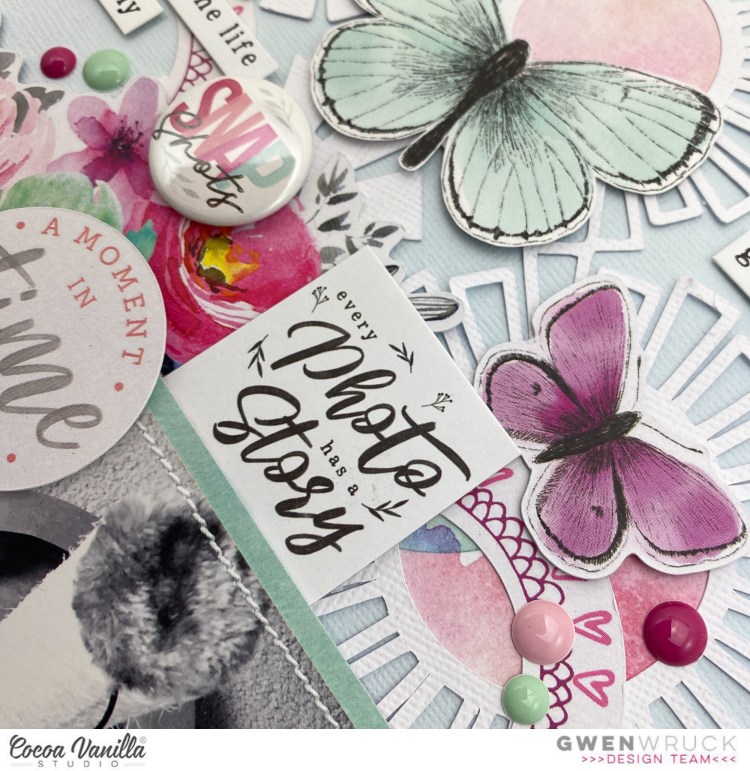
Here you can see the ‘Flair Button’ from the collection and my main embellishment cluster.  I’ve also included some fussy cut out butterflies from the ‘Pretty Bits’ pattern paper.  These butterflies are a little larger than some of the other butterflies in the collection so they are perfect to mix and match.

To finish the layout, I’ve included some of the sentiment stickers from the ‘Accessory Sticker Sheet’ as well as some of the ‘Enamel Dots’.

I’ve also made a You Tube video for this share which you can watch here, I hope it inspires you.

Until next time,

FUN + SUN | SUNKISSED | GWEN WRUCK

Hey Creative Friends, I’m back on the blog today with another share for Cocoa Vanilla Studio. I’m using more of their new ‘Sunkissed’ collection to document a sweet photo of Miss C from a few years back.

To start the page, I’ve backed a cut file, this one from CUT to YOU called ‘Fun plus Sun‘ with pattern papers from the A5 Paper Stack. The smaller prints in the A5 papers are ideal for this and I love how there are a couple of exclusive prints in the pack.

I’ve backed my photo with the ‘Sunny Days‘ pattern paper and used it to create a border around the base of my page. For the background of my layout, I’ve used a piece of pale blue card stock from my stash. I’ve also added here my signature stitching, I just love this detail.

Next, I’ve added my backed cut file onto the layout centred and a little towards the bottom of the page. Then, I’ve placed my photo at the centre bottom. I’ve raised on foam for dimension so it’s now time to embellish.

For the embellishments, I’ve gone with three clusters to create a visual triangle on my page. The main cluster features a sweet rainbow from the ‘Die Cut Ephemera‘ pack and a Sunshine element from the ‘Puffy Sticker pack‘ as well as some floral die cuts from the ‘Floral Ephemera pack‘.

For even more interest on my page, I’ve added in some of the ‘Wooden Buttons‘. I love the texture of these. As I build out the clusters, I’m making sure to have at least one of each of these in each one. I find that when I replicate elements in each of my clusters, it really helps pull the page together.

Here you can see the die cut pieces, a wooden button, puffy sticker and a typed sentiment from the ‘Accessory Sticker Sheet‘. I like to add these stickers with foam tape for added dimension. They really are a great way to round out a page and the sentiments really help to tell the story in the photos.

I’ve also made a YouTube process video for this layout which you can watch here:

Thanks for popping by today.

Until next time,

Gwen

xo

ADVENTURE BEGINS | CUT TO YOU

Hey there Creative friends! I’m back on the blog today with another scrapbooking layout idea for CUT to YOU. For today’s share, I’m documenting another family outdoor adventure, this time with the help of one of the title cut file designs.

I decided to feature the ‘Adventure Begins‘ title for this one and cut it nice and large on white cardstock. It was perfect for my photo and a great way to help tell my story. I’ve backed it with pattern papers from Jen Hadfield ‘The Avenue’ collection. I’ve then added 3D foam to the back of the whole design and positioned towards the bottom of my layout making sure to centre on the page left to right. When working with large designs like this one, its important to make sure your design is nice and straight on your page. A T-square ruler is fab for helping you achieve this.

I’ve then positioned my photo so that it nestles into the design. When I was creating this cut file, I purposely positioned the text ‘and so the’ to the left (not centred) so that you would have somewhere to place your photo. You could use 6×4 or 6×8 in landscape or portrait. Lots of options with this one.

With the photo and cut file title locked into position, I’ve gone ahead and created two large embellishment clusters one towards the top left and the other in the bottom right hand corner of the page. I’m always thinking about how the eye will flow across the page. For this I’ve used elements in the collection including die cut pieces and sticker elements. I work largest elements to smallest elements and just layer everything up until I am happy.

Last, I’ve added in some small gold chipboard hearts from Maggie Holmes. I love the smaller detail they add to the page and they round everything out nicely.

I’ve also made a YouTube video with more details about this layout including why I chose the bird, squirrel and car elements which you can watch here:

If you are looking for even more inspiration using this collection, I’ve created another layout which you can see here.

Until next time,