LOVE THIS | WILD AT HEART | GWEN WRUCK

Hi Creative Friends,

I hope you are all doing well!  I’m on the Cocoa Vanilla Studio blog today with another share for you of my Miss 12 AND details of how you could win yourself some new Cocoa Vanilla goodies!  Cocoa Vanilla Studio is proud sponsors for the CSI Challenge site this month and I was one of the design team that played along.  It’s a fab challenge site so well worth checking out with so much inspiration for all!   Here is my take on case number 280.

and here is the case file from the CSI Scrapbook ChallengeI was inspired to solve.  Lots more details on their blog if you’d like to play along as well.

The inspiration for the page most definitely started with that floral background in the scene.  It immediately reminded me of this floral vellum sheet from the Wild At Heart collection.

I have been hoarding several of these sheets and figured this was the perfect time to use it especially when I saw that one of the traditional clues is to pull something from your stash.  I also pulled the lovely blue and mint green from the image on the case file and set that as my colour scheme.  The Mariposa paper from the collection was perfect, so I set that as my page border and used the centre of the paper to back the cut file.  This one is from the FREE cut file set from the ‘Happiness’ collection, available here.

For something different, I turned the ombre to run across the page from left to right, rather than top to bottom.  I set the backed floral cut files to match the ombre tone on tone, the blue one on the left, and the mint one on the right.  This then set the base for the design of the page.

Next up, I matted my photo, firstly in some more of the Mariposa paper, then also in more of the vellum.  This helps bring the page together with the vellum behind the photo and also on the floral leaves in the background.  It was then time for embellishing.

The case file image included a picture of a bicycle, whilst I didn’t have one that matched my colour scheme, I decided to pull out some circular elements to represent the bike wheels but still coordinating with what I already had going on.  I like how they play off the lines of the florals.  These teamed with die cut elements from the die cut ephemeraChipboard Stickers and Accessory Stickers really helped my page come together.  I simply built the main cluster of elements on the left with the focus on the blue tones and a smaller cluster of elements on the right with the mint tones.  Working tone on tone is a really easy way to help things coordinate and give your page a consistent feel.

I also added my title at this point, these die cuts are from the latest collection ‘Happiness’.  Lastly, I thought, this page needs more butterflies!  So, I flipped over the remaining pieces of the Mariposa paper I have used and fussy cut out three to place around my page.  They really round out that floral spring vibe I have going on which really is the theme of this case.

Thanks for popping by today, I hope you get a chance to play along with CSI Challenge and in doing so, you can win yourself an awesome Cocoa Vanilla Studio prize.  Be sure to share with us if you do!

Until next time,


I HEART YOU | CUT TO YOU

Hi Creative Friends,

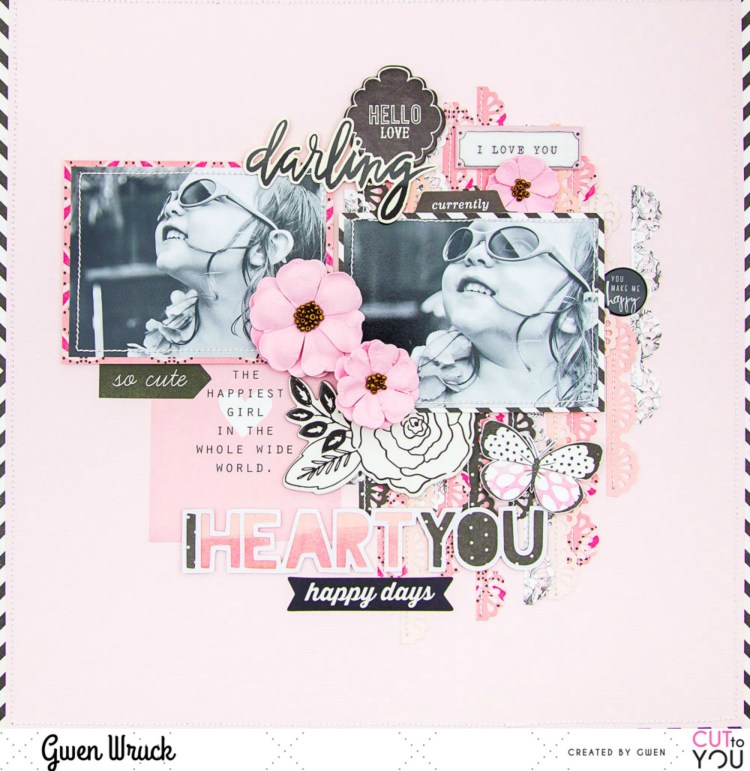
I’m up on the CUT to YOU blog today with a new share, this one featuring one of their TITLE style digital cut files and an older picture of my little miss!  I’ve gone with a monochromatic colour scheme for this page, and it’s one of my favourites, black & white plus pink!

CUT to YOU has a huge range of digital and custom cut files that are designed as titles for your pages, you can check them all out here.

I’ve used the ‘I Heart You‘ design. I cut it as it is on my Silhouette and then with my fussy cutting scissors, trimmed off the heart shapes as I wanted just the text for this page design.

To create the page, first up I cut thin strips of pattern paper in various shades of Pink.  Then, using my border punch, punched down one side.  I’ve layered these all up on my background and then stitched along one edge.

Next, I went about matting my two photos, I’ve mixed up the pattern paper for these, not only because I wanted an eclectic vibe to the page, but also because I was using up lots of bits and pieces from my stash.  These are my most favourite pages to make; you take a few bits & pieces which really amount to “not much” and turn them into something special.

I positioned my photos onto my background, slightly covering up the paper strips, they are acting as a base for my page.  I then went about backing the cut file.  For this, I’ve used two pattern papers and alternated down the words in the file.  I’ve chosen darker paper for this to help the white outline of the design stand out.  I mounted the file with some 3D foam to raise it up from my background and positioned on my page.

Now it was time to dig through my stash for some embellishing pieces.  The first thing I found was this cute 3×4 journalling element with the quote “The Happiest Girl in the whole wide world” and I thought it was perfect for this page, so on it went!  Next, I went on the hunt for some black and white elements to coordinate with the black and white images.

I found this perfect chipboard floral piece from Maggie Holmes and a stack of other elements from a wide variety of collections and manufacturers and they all go because of their neutral black and white colour scheme.  I just kept digging through my stash finding and auditioning pieces here there and everywhere on the page until I was happy with how it was looking.

I’m really happy with how this turned out and love how the digital cut file design for my title came together.  I love how it works with all of the other elements on my page and It’s actually really nice to have a title sorted for my page without a lot of thinking about it!

You can see the latest designs from CUT to YOU here, and their selection of Title & Words here.

Until next time,

CUT to YOU for Cocoa Vanilla Studios

Hi Creative Friends,

Boy, do I have something exciting to share with you today!  I am super proud and excited to announce the very first “CUT to YOU for Cocoa Vanilla Studios” cut files!!! That’s right, I’ve been working with Zoe from Cocoa Vanilla Studios to create a special set of cut files, inspired by her gorgeous designs that will complement the stunning “Happiness” collection.  What’s even more exciting, you can get them for FREE!!! That’s right, find them here for FREE.

Happiness CUTFiles

AND… of course, I wanted to share my very first page using the files!!

As soon I saw the collection, I was drawn to those signature florals of Zoe’s… she really does know how to make floral designs, I knew straight away I wanted some floral cut files to go with them!  I went about simplifying her floral shapes to create a set of roses and leaves and these are the files I worked with for this page.  I simply cut them out super large and used the mirror feature on my Silhouette Cameo 3 to make one of them a mirror image for added interest.

I then went about backing the files, for this, I’ve used the “Meadow” paper which has this divine pink watercolour ombre effect and the brown on the leaves is from the “Bright & Beautiful” paper.  Once backed, I simply added to my page along the right-hand side running from the top to the bottom.  I just love the statement these make!

Next, I found the same “Meadow” paper in the 6×8 paper pad and mounted my photo.  I’ve also added my signature stitching, I don’t think I could ever miss that out!  I’ve positioned it on the left at the bottom of my page.  I want the roses to be part of the design, but I don’t want to cover them up very much, they are just so so pretty.

Now all that was left to do was add in some embellishments and my title.  I’ve gone pretty simple with the embellishments, fussy cutting out some butterflies from the “Bright & Beautiful” paper and adding some die cut element from the ephemera pack.  The title is from the Die Cut Titles pack and I’ve positioned at the top of my page to balance out the photo.

I’ve also added a flair button down by my photo, I love the pop of black here and it balances out my title nicely as well as adding a little interest to that simple cluster.  AND…. that was the page done, and why I love working with cut files oh so much!  They really help you lock in a layout for your page which helps the pages come together really quickly.

Now, if you haven’t already, go get yourself a set of the FREE cut files which you can grab here and then, get creating!  As always, be sure to show me what you make, I really love to see! #cuttoyou #cocoavanillastudio

Until next time,

BEAUTIFUL GIRL | SUGAR & SPICE | GWEN WRUCK

Hi Creative Friends,

I hope you are all doing well!  I’m up on the Cocoa Vanilla Studios blog today with this sweet page of my daughter Caitlin.  For this layout, I’m using the Sugar & Spice collection for Throwback Thursday!  I just love these features, I get to dig deep into my stash and come up with fresh inspiration from an older Cocoa Vanilla collection.  For this layout, I’ve gone all the way back to the start of 2015 and one of the very first Cocoa Vanilla collections.

The inspiration for the page most definitely started with the collection.  I pulled out all the bits and pieces I had and took in the pretty soft colours.  I had a full sheet of the Journal Cards paper as well as the Dot to Dot paper and a couple of sticker sheets from an original collection pack. I also had some paper scraps, very small pieces though.  I then got to thinking about adding a cut file and remembered that there were designs released with the Colour Me Happy collection from 2016 so went about cutting some of those out on some plain white cardstock from my stash.  You can shop them here.  There are florals and titles and lots of super fun elements, well worth checking out!

At this point, I had a clean white background and some fresh cut files also in white.  I love a border on all of my layouts, so I began by cutting out the centre of the Dot to Dot paper and using the centre part to mat my photo.  The outer edge became the frame for my page.  I double matted the photo using a paper scrap of the Candy Stripes paper.  I then positioned the cut files and my photo getting the base of the design locked in.

Next, I went about finding a coordinating element from the Journal Cards paper, I’ve gone with the element that says “Beautiful Girl”, not only because of it’s colour, but the sentiment is perfect as well.  I’ve positioned that to the left of my photo, I love how it runs horizontally the same way that my photo does.  It really helps draw the eye across the page.

I knew I wanted to use a lot of the sticker elements on my page, mainly because I had so many compared to how much pattern paper I had left, you really do get a lot of elements on these sticker sheets.  I decided to really roll with the floral elements, adding them to my page to build on the feature of the cut file.  I essentially created one large cluster down the right-hand side of the page.  Some of the flowers I have mounted onto foam for dimension, others I’ve added directly to the page.

I then went on to add some of the sentiments from the sticker sheet, again using foam tape for some for dimension and interest.  I took the large sentiment ‘Beautiful’ and used that as a subtitle for my page tucked underneath the journal card and photo I positioned earlier.  I’ve also used the cute banner pieces and added some stitched detail to make my banner pop.

I was really happy with how this was all coming along but felt the page needed grounding.  It felt like it was a bunch of elements just floating in the centre of the page.  So, I took the long border strip from the Accessories Sticker sheet and trimmed a small piece from one end.  I positioned the small piece on the left of my page and the larger piece on the right-hand side.  I found this helped draw the eye from my photo on the right down and across the page past my title to the left.

At this stage, the page needed a few small finishing touches, so I’ve added in some tiny hearts, again from the sticker sheet.  I then also, grabbed a couple of very small scraps and using a steel roll die from my stash, made a paper bow, it was the perfect finishing touch.

Thanks for popping by today, I just love how this page turned out!  I hope it encourages you to dig into your stash and create something with an older collection.  If we use up the older stuff, we feel so much better about getting all the new things right?

Until next time,

WEEKEND VIBES | CUT TO YOU

Hi Creative Friends,

I hope you are all well!  I’m up on the CUT to YOU blog today with a share featuring one of our brand new cut files, only released last night!  Being the designer, I do get a few privileges and that is first access to the latest designs… I mean, someone has to test them all out right, before they get shipped off to new homes! 🙂  This is one of my most favourites ever, so it went straight onto a page!

Here is the cut file… fresh from release, you can grab it here.

To create my page, I started by backing the hot air balloon.  I did cut it very large, as I knew I wanted it to be a real feature on my page, so backing it was pretty easy.  I did mix up the pattern papers a bit just for added interest, but you could absolutely do the balloon in just one pattern paper to make it easier and I know it would still look great!

Next, I added my mat to my photo and stitched around the edge, and then went on to position it on my page.  I wanted my daughter to be facing in towards the centre of the page, so the balloon had to go on the right-hand side and as it turns out the ribbon on the basket was on the right-hand side too, which worked out perfectly!

Next, I wanted to add some subtle interest to the background of my page.  To do this, I’ve cut out the clouds in the cut file on white cardstock and positioned flat onto the background for a white on white effect.  I love the subtle result, soft like a cloud.

It was now time to work on my title.  It actually started with the cute flair button with the words ‘Weekend’ on it.  This photo was just a happy snap taken at a park on a regular weekend, so I went with “Weekend Vibes”.  We used to do this so much when she was little.  Now that she’s a ‘tween’ it’s a little harder to get her out of the house!!

I then went digging through the Die Cut Ephemera pack to see what other elements I could add to the page, it didn’t need much at this stage, just a few little touches.  I’ve gone with some more word sentiments, some pretty florals and butterflies.  I’ve also added in some of the ‘Accessory Stickers” to build on the sentiment in the title and round out the page.


Thanks for popping by today and seeing our latest release cut files in action AND for your support of CUT to YOU.  Release after release I’m not only blown away by the lovely comments I get about the new designs but also by your support by purchasing them and using them on your projects!

Our  Facebook group is always full of inspiration because people like you share your makes, so THANK YOU!

Until next time,