HAPPY HOME | GWEN WRUCK

Hey there Creative friends! I’m back on the blog today with some more Scrappy inspiration, this page created for CUT to YOU. For today’s share, I’ve created the first of many pages I hope to make about our new family purchase of a Caravan. This photo was taken on our very first trip away in the van. I’ve used the Jen Hadfield ‘The Avenue’ collection for my page. I adore the green tones and florals, perfect for my outdoor photo.

To create the page, I first took the time to back the ‘Van Life‘ cut file. I even added some vellum in the areas of the window and door and I love how that looks. I simply backed each section one by one alternating pattern papers from the collection. I love how a digital cut file like this one can really help to tell the story of my photos.

I created a double photo mat for my picture. I’ve used a floral pattern paper for my first matt, and then some more vellum for the second matt. I don’t usually double-mat my photos but did want to include a softer edge around my photo for this page.

I then positioned my Caravan cut file and photo (not stuck down as yet), I’m just positioning to get an idea of where these large elements would go on the page. Then, I’ve cut two of the trees from the ”Christmas Tree Quad‘ cut file. I’ve cut them in a dark green pattern paper from the collection to help them stand out from the background.

Once I was happy with the position of the Van, the photo and my two trees, I added the smallest amount of glue to the trees and then added stitching along their trunks for added detail. Once that was done, I could go ahead and glue into position the van and my photo.

From there, I’ve added in my title ‘Happy Home’ which is a die cut piece from the collection and some Thickers from my stash. I’ve also included some handmade cloud embellishements from ‘Charm Creations’ as well as some die cut ephemera floral elements and two sweet die cut butterflies.

To finish the page, I’ve added in some sweet puffy hearts, the touch of gold in these is a really nice finishing touch.

I have made a YouTube video with more information about this layout which you can watch here:

Until next time,

VACAY MODE | DAYDREAM | GWEN WRUCK

Hi Creative friends, I’m back on the blog today with a fun summer-themed project for you created for Cocoa Vanilla Studio.  I was super inspired to use the ‘Daydream‘ collection for this photo of myself and my daughter on a recent family vacation to Harvey Bay in Queensland.  I loved the soft fresh colours in the collection, they were the perfect match for my photo.

To begin the page, I wanted to create a soft sunburst effect on my background.  To do this, I’ve used a stencil and mists from my stash.  Once my mist was dry, I’ve gone ahead and stitched with my sewing machine, along the lines in the stencil for an added detail.

I’ve then trimmed this piece and mounted it onto the ‘Sun Shower‘ pattern paper.  I’ve trimmed this pattern paper as well and added it onto the ‘Daisy Days‘ pattern paper to create a double border for my page.  I’ve also added stitching along the outer edge to finish the background off.

For the title of my page, I’ve used a cut file from CUT to YOU called ‘Vacay Mode‘, backing it with a mixture of papers including those mentioned above in my layout base.  I’ve then mounted the whole title piece onto 3D foam.

For my photo, I’ve used more of the ‘Daisy Days‘ pattern paper to create a photo mat and added some stitching here as well.  For this layout, I’ve gone with a pretty sky blue for my thread to add some contrast.

Next, I’ve mounted my photo onto 3D foam and added it to my background.  It’s at this point that I have also locked in the position of my title.  With these elements in place, I can now add the embellishments.  For this, I’ve started with a fussy cut piece of the florals from the ‘Garden Variety‘ pattern paper and added to that some floral elements from the ‘Die Cut Epherma‘ pack.  I’ve also added in a ‘Flair Button‘ and one of the Puffy Hearts.

I’ve also included some fussy cut elements from the ‘Happy Place‘ paper, such as the sweet little rainbows.  Lastly, I’ve added a few of the fussy cut moths from the ‘All a Flutter‘ pattern paper mounted on 3D foam and some sentiments from the ‘Accessory Sticker Sheet’.

Did you know I also create YouTube videos? You can watch me create this page, start to finish below:

Thanks for popping by today to see how this page came together.  As always, I hope I have inspired you in some way and I can’t wait to see what you make!

Until next time,

HELLO BEAUTIFUL | WILD AT HEART | GWEN WRUCK

Hi Creative friends, I hope you are all doing well.  It’s Throwback Thursday today over on the Cocoa Vanilla Studio blog, so I’m diving into my stash and using the ‘Wild At Heart‘ collection.  This collection is from 2017 and I still absolutely adore it.  I love the mix of colours in the line and especially the blues and purples, and the sentiments are all so sweet.  I’ve used it to document some fun photos of my daughter just before a school disco from a few years back and especially love the theme to ‘Be your own kind of Beautiful’.

I had quite a bit of stash left in this collection embellishment wise however, I was a little short on the ‘Patchwork’ pattern paper which I really wanted to use. To work around this, I’ve planned out my page first. I knew I wanted to work with this cut file from CUT to YOU, it’s called ‘Spring Floral Banners’ and an exclusive design. First up I needed to decide the position of my photos. From there, I could save time and paper by only backing the parts of the cut file that would be showing. No one would ever know that behind my photos, the cut file is not backed at all.

To back the cut file, I’ve used the ‘Patchwork’, ‘Luscious’ and ‘Artisan’ papers.  For my background, I’ve used a plain pink cardstock from my stash and framed it with the ‘Bohemian‘ pattern paper which is still available in the shop.  I’ve then added some stitching for extra detail.

Working with the supplies I had left, I’ve gone through them and pulled out anything I thought would match, looking at the sentiment in the pieces and their colour.  I decided on three focal points to create a visual triangle, two towards the top right-hand side of my page and one bottom left-hand side of the page.

I then fussy cut out three of the butterflies from the ‘Mariposa’ pattern paper and positioned them; one in each spot in my visual triangle.  From there I built my embellishment cluster, starting with larger pieces first, working towards the smaller elements.

I’ve used the title ‘Hello Beautiful’ from the Chipboard Sticker Sheet, I love how big and bold it is.  I’ve also used several of the sentiments from that sheet, (including the pink arrow below that says ‘wonderful’) the dimension chipboard creates on the page is really lovely.

I’ve also pulled some sentiments from the ‘Accessory Sticker Sheet’ – I especially love the typed sentiments at the bottom.  I’ve added these to my page using 3D foam tape and to finish up the layout, I’ve added in a flair button and the ‘Enamel Dot Sparklers’.

I’ve also made a YouTube video of my process which you can watch here:

I hope you enjoyed seeing how I’ve put this page together.  Do you have any Wild at Heart still in your stash?  Why not pull it out and get creating.

Until next time,

LOVE YOUR SELFIE | DAYDREAM | GWEN WRUCK

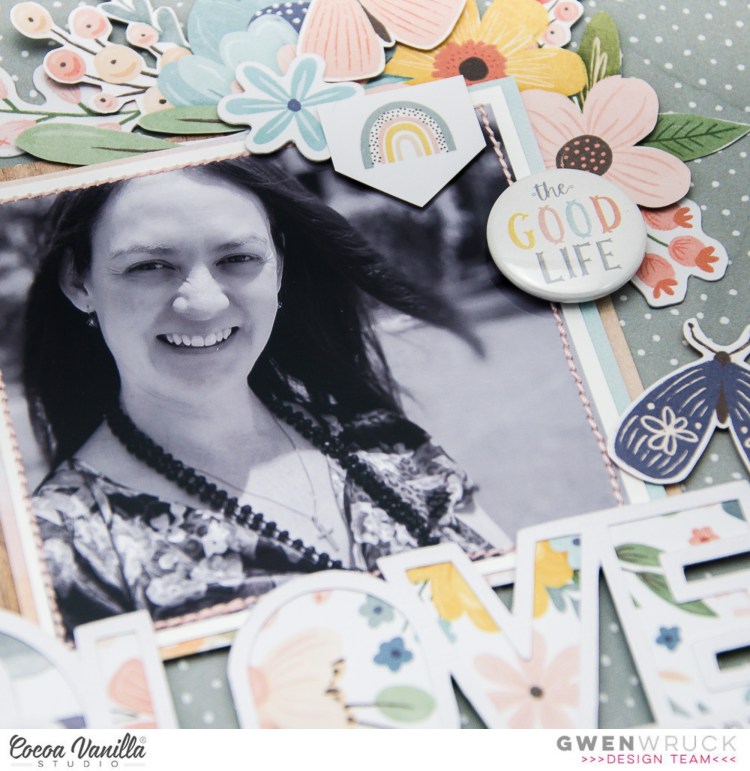
Hi Creative friends, I’m back on the blog today with a new share for Cocoa Vanilla Studio using their brand new ‘DayDream‘ collection. For today’s share, I’m working with this picture of me. Yes, I’m still on a bit of a mission to scrapbook more layouts featuring photos of myself. I tend to do a lot of my daughter so it’s been fun to create a couple recently of me.

The idea for the page definitely started with the photo for this one, and with it being black and white, I thought it might be fun to pop it onto a coloured background. I’ve gone with the grey and white spot pattern in the ‘Garden Variety‘ pattern paper. I’ve used both sides of this paper for my background, adding a frame around the edge of my layout using the floral side. I’ve added stitching in a pretty pink thread for an added detail.

Next up, I’ve backed my cut file. This one is from CUT to YOU and is called ‘Love Your Selfie‘. I’ve used more of the ‘Garden Variety‘ pattern paper to do this. I’ve also used ‘Sweet Serenity‘ and ‘All Aflutter‘ pattern papers as well.

I’ve used these same papers to mat my photo, opting for a double mat for this page.

For the embellishments, I’ve fussy cut elements from the ‘Happy Place‘ pattern paper including the sweet rainbows and cute tab elements. I’ve also used some fussy cut florals from the ‘Garden Variety‘ pattern paper. I’ve teamed these with pieces from the ‘Ephemera Pack‘ as well as a ‘Puffy Hearts‘ and ‘Flair Button‘.

To finish the page, I’ve fussy cut out three moths from the ‘All Aflutter‘ pattern paper and added to my page with foam tape.

I’ve also made a process video for this layout which you can watch here:

Thanks for popping by today, I hope my layout has inspired you to get creating!

Until next time,

SEASON OF JOY | GWEN WRUCK

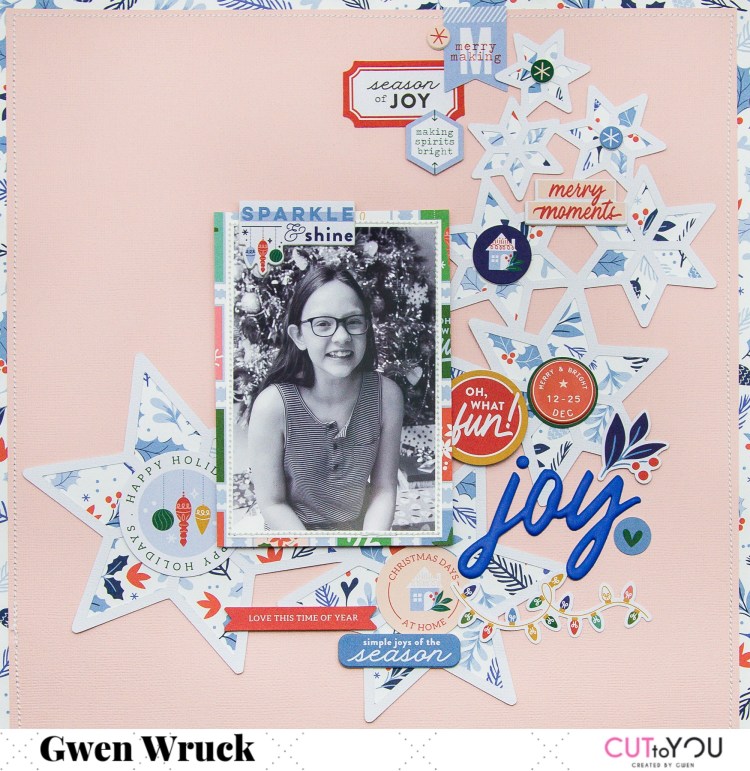
Hey there Creative friends! Super excited to share another Scrapbooking process with you. Today’s share is for CUT to YOU and I’ve created another Christmas layout. If you are following along on my YouTube at Created by Gwen you’ll have seen the big Christmas Stash Bust series I did in December. I used up a stack of goodies so didn’t feel guilty at all about getting the new Pink Fresh Studio Collection and working with it on this page. That is the wonderful thing about using up older supplies; you can go ahead and buy new ones!

I was a little time poor when I was making this page so decided to back the cut file in the one pattern paper. It didn’t take very long as it is a simple design around the outside edge. You could use a different pattern paper in each of the stars for a more dramatic look as well, it will just take a little longer to back. If you’d like to see how I back my cut files, I have a couple of videos on YouTube you can check out.

I’ve positioned the file centred on my page and added my photo to the left-hand side of the layout. I’ve also used the same pattern as a border for my page so that the border matches the pattern in my backed stars.

Next, I wanted to work on my title. I was concerned I might run out of space for it if I didn’t lock it in early in my process. I’ve gone with the word ‘Joy’ which is a puffy sticker.

I’ve then worked on adding lots of bits and pieces from the ephemera packs and die cuts in the collection. I’ve worked with the idea that larger elements will go towards the bottom of the page and smaller elements at the top of the page to match the size of the stars in the cut file. I’ve also been careful to include round or star shaped elements, not square as they would be too ‘blocky’ for the look I’m going for here.

I’m being really careful to consider not just the shape of the elements I’m adding but the colour as well. I’m trying very hard to balance out the heavy colours on my page with softer ones. In particular, the blue and red tones.

I’ve just kept mixing and matching until I felt the layout was complete. I think this one is a simple yet striking design and certainly one you could recreate in a short period of time. If it inspires you to make a page, I’d love to see it, so be sure to tag me or #cuttoyou on social.

I’ve also made a YouTube video process for this page, which you can see below.

I hope you enjoyed this one,

Until next time,