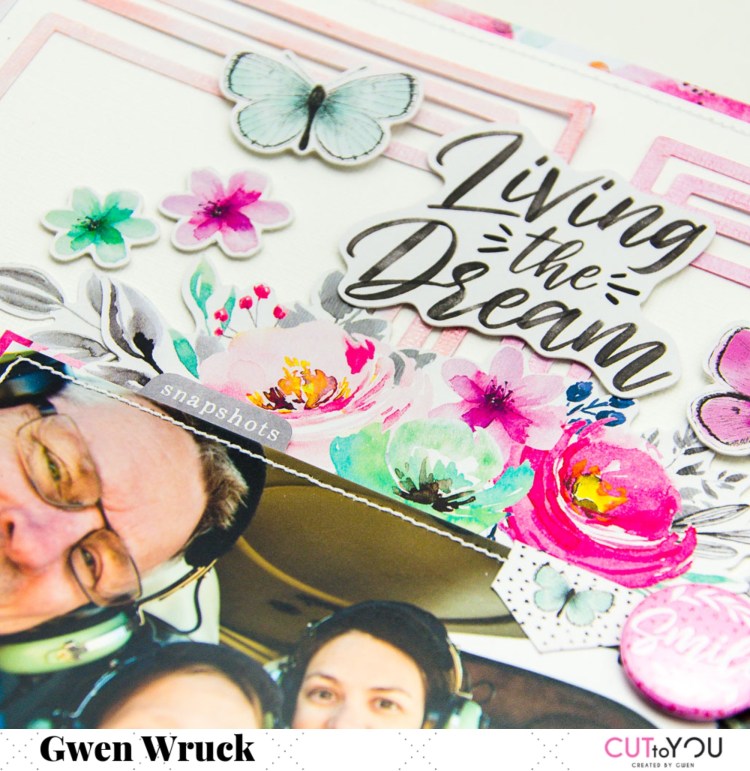
LIVING THE DREAM | CUT TO YOU

Hi Creative Friends,

I’m up on the CUT to YOU blog today with a new share with a file I’ve been meaning to work with for a while.  It’s called ‘Quad Frames’ and when I designed it, I had in mind the grid design scrapbook pages that I love the simplicity of.  Funnily enough, though, my first page working with it turned out to NOT be a grid design at all!


As I mentioned above, the idea for the page actually started with the cut file ‘Quad Frames‘, I had this one on my list for a while now to create with and had planned to make a grid design page.  I also had on my desk the latest collection by Cocoa Vanilla Studios which I am crushing over right now, and this picture of my husband, daughter and myself in a helicopter flying over the Grand Canyon!  I have had this photo in my pile to create with for years now and just couldn’t get the colours to work, until ‘Unforgettable’ came along, it was a perfect match.

The Quad Frames design was cut as large as I could on the 12 x 12 cardstock. I then pulled out some Shimmerz watercolor paint.  I’ve coloured each block of the design in a new colour and initially was thinking of keeping the blocks and doing something in a tone on tone look for each square.  Pink elements on the pink block, green elements on the green block etc.

It was at this point that I realised that the photo was just too large (width ways) for that to work and I didn’t want to reprint smaller or crop it any further, so I changed plans.  I decided on a vertical design with the photo in the center of my page.  I mounted it on a pretty floral paper and stitched around the edge.  As always I’ve added stitching here too.  This same paper I’ve used for the outer edge of my page and added stitching around the edge as well.  I do this a lot because I feel it really pulls the elements of the page together.

Next, I stuck down the cut file keeping everything really centered and then added my photo on top.  I’ve then gone ahead pulling out lots of elements from the collection and adding pieces working from the top to the bottom of the page down the centerline.

I’ve just kept auditioning elements until I was happy, being careful to consider how the eye will be directed around the page and how all of the elements tie together.

I’d really loved the sentiment ‘Living the Dream’ because this America trip was a dream come true for me, I had always wanted to go to Disney Land and the Grand Canyon for a white Christmas and it was so good to be able to go and do that and give that gift to our daughter.  Lots of journaling on the back of this page for this one!

And that was the page done!  I love how the cut file frames the design for this one and that even though the page wasn’t what I had initially thought to do, I still love how it turned out.

Thanks for popping by today,

Until next time,

BLOOM | UNFORGETTABLE | GWEN WRUCK

Hi Creative Friends,

Happy Wednesday to you all.  I’m so excited to be back on the blog today with another Cocoa Vanilla Studio share.  I’ve had some more time to play with the new ‘Unforgettable’ collection which I am absolutely loving!  I was looking through my pages recently and noticed that I hadn’t done one of myself in a while.  I can’t say I love scrapbooking about ‘me’ but I know how important it is, so pushed through the self-consciousness and got to creating.

The inspiration for the page came from all the pretty florals in the collection and the word from the Foam Titles ‘Bloom’.  I wanted to document some changes that have been happening personally for me over the past year or so and love this sentiment.  We should always be growing and developing and I thought this would be a nice page to represent that.  (I’ve put a lot of journaling on the back of this one!)

With so many pretty pattern papers in the collection, I wasn’t sure where to start so I pulled out the ‘Pretty Bits’ paper and trimmed it so that I would have some colour blocks of the patterns.  When in doubt as to which pattern to use, I went with using them all!!  I’ve positioned the strips on the left and right sides of my page.


Next, I’ve taken another strip, wider this time, from the same pattern paper and added that to create a wider block of colour.  I’ve also now added some machine stitching down the edges for added detail.  Now it was time to mat my photo.  For this, I’ve gone with the ‘Garland’ paper.  I can’t believe I chopped into that wreath on the other side of this paper, thank goodness the Collection pack has two sheets of each design!

I’ve added more stitching around my photo, I just love how it sets it off.  Now it was time to play with the elements from the Ephemera Pack.  To start, I pulled out the black and white wreath element.  I’ve cut that in half to stretch it out over my page.  One half went above my photo, the other on the right as the base of my element cluster.

I’ve gone through the pack adding elements running from the top left of the page, down the centre line to the bottom right-hand corner.  I find this helps draw the eye around the page.  I’ve also added in the title at this point, above my photo and across the wide blocks of colour from the pattern paper.  I just the pop of black in this collection, so striking!

I’ve also added in a flair button as well as a cute bow.  I love the dimension these elements add to the page AND you all know how much I love a bow!

Thanks for popping by today to see my latest project, I hope it inspires you to get creating. If you don’t have any of the new ‘Unforgettable’ collection yet I urge you to go and get shopping, it really is beautiful and so nice to create with.

Until next time,

WORK SAVE TRAVEL REPEAT | CUT TO YOU

Hi Creative Friends,

I’m up on the CUT to YOU blog today with a new share today featuring one of the newer designs and playing with some more new scrappy goodies!  I’ve been itching to scrap this pic of Miss C and me for a while now and this cut file was perfect for it!

I really wanted to design some cut files that would help us all document our travels.  Rather than creating specific ones for locations we might visit, I wanted some that could be broadly used for any kind of travel no matter what the destination and this one ‘Traveler Background‘ is one of my favs!

I’ve blown up the world shape super large and positioned on the background of my page, overlapping one edge.  I’ve also added some stitching along each of the lines just for some extra detail.  Next, I went about backing the title.  For this, I’ve done it in blocks of colour, I felt like I needed to help it stand out from that watercolor pattern on the background, and figured this would be a good way to go about doing that.  I feel like the colour blocking also helps you read the title.

I’ve mounted the title up on foam as well which helps separate it from the background, especially when viewing the page in real life.  I then mounted my photo and positioned the photo and title piece onto the background.  You’ll see it’s a perfect fit edge to edge! (No, I didn’t plan that when sizing the title, it just worked out that way).

The page was really coming together now, it was just a matter of adding in some embellishments.

I didn’t want to do too much and take away from the work I had already done so I’ve kept the embellishing really to two small clusters, one at the top right-hand side of my photo, the other on the bottom edge of the photo.  I feel these do help lead your eyes down the page and finish off the page nicely.

I am in love with this collection and this cut file and will definitely be using it again for more of my travel pics!

Thanks for popping by today,

Until next time,

YOU ARE SPECIAL | UNFORGETTABLE | GWEN WRUCK

Hi Creative Friends,

I’m sharing for Cocoa Vanilla Studio today and I’m crazy crazy excited to be using the beautiful new ‘Unforgettable’ collection!  Seriously, this collection is just divine!  I actually get quite nervous working with a new collection, I want to be sure I do it justice.  I imagine how much work Zoe has put into designing it and I don’t want to let her down.  I have to say though, this one was so so easy to work with straight away, I’m already calling it a real contender as my favourite of all time.

I began the page with some fussy cutting, as I mentioned, I do sometimes struggle knowing where to start with oh so many pretty choices, so a bit of fussy cutting is a great way to ease myself into it.  I fussy cut out the four butterflies from the ‘Pretty Bits’ pattern paper.  I then decided on my photo and went to the ‘6×8 inch paper stack’ and mounted it with the bright pink pattern ‘Unscripted’.

Next, I decided to use a plain white cardstock for my base but wanted to add some colour.  I’ve taken a stencil and added some watercolour spray.  Once dry, I’ve chosen a cut file, this one from CUT to YOU for my title.  Yes, there are the most divine foam title stickers in the collection, but I’m currently hoarding those!  Again, I’ve used the paper stack to alternate pattern papers to back each letter.  I love that for this collection the papers are not glued together into a pad, they are all individual sheets so it is super easy to pull them all out to audition each design before you commit to anything.

Once my cut file was all backed and looking lovely, I’ve position onto my background with some foam tape.  Now it was time to look through all of the pretty embellishments.

I’ve started with the Ephemera pack, which has 65 pieces, including florals and butterflies and banners and auditioned EVERYTHING, it is all so so nice! As well as the ‘Bows and Tassles’ pack, there was no way I wasn’t going to include a bow on this first page!  I’ve also matched the ‘Enamel dots’ from the collection with the pop of the pink in the pattern paper.
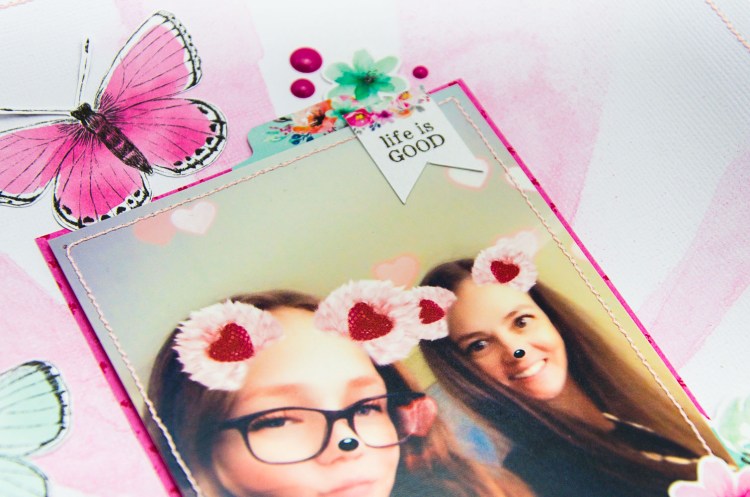
I thought it best to lock in the position of my large fussy cut butterflies first and then work in the smaller elements.  I did end up with just the three for this page. I did find a matching butterfly from the ephemera pack which was the perfect fit as it was quite a bit smaller than the others.

I’ve added in some florals to the left and right of my photo as well as a pretty little cluster of banners and florals above the right-hand side of my photo.  I find this gives the eye three places to rest as it moves around the page and really rounds out the design.  Lastly, I added in the bow and the enamel dots and called it done.

Thanks for popping by today to see my latest project, the first of many with this new collection.  It is shipping now and I know many retailers have pre-orders available, so if you don’t have any on order yet, get onto that, it’s even prettier in real life!

Until next time,

“Smile” for Scrap the Girls September 2019

Hi Creative Friends,

The first of the month means it’s time to share another fab challenge at Scrap the Girls.  This month we are being inspired by a sketch, this one created by the fabulous Sue Plumb.  I will admit I was a little worried about this one to start due to all that ‘mixed media’ in the background, but as always, found a way to make it “me”.  I know I say this a lot, but it’s important to stay true to you and what you like; even when working with a challenge or theme.  Here’s my page:

and this is the sketch Sue created.

Ok… so, as you can see, I did go a little off track with the sketch, but I promise the inspiration for my page started with it.  I think it’s totally fine to change up some elements of a sketch to make it your own, so here’s what I’ve changed.  Firstly, the photo… I didn’t have a 6×4 landscape to use so I’ve gone with a square 4×4 image.

Secondly, because I had some space to the left of my photo that wasn’t in the sketch, I’ve added a much larger banner element than what is pictured in the sketch, I’ve just mixed up the proportions here.  Lastly, I’ve used a cut file which I’ve misted with some shimmer spray as a substitute for some of the mixed media.  Those of you know me, know I’m a very clean scrapper, so I’ve gone with the cut file in lieu of some of the mixed media, but you can still see I’ve added it in keeping with the sketch. You can shop the cut file here.

The collection I’ve used for this one is by Echo Park and it’s called ‘Teen Spirit’; I love the fun feel to this collection!  So fun to use something light-hearted to document Miss 12.  I can see quite a few more pages being made with this collection because there really isn’t a lot of scrapbooking products like these on the market.

My process for the page started with my photo, I’ve mounted that with some bright pink pattern paper from the collection and then built a photo mat/centre feature that was loosely based on the sketch.  I’ve just kept building it until I was happy and then once that was locked in, I had a framework for the cut file and watercolour background.

When working on my background, I have kept bringing back my photo elements to see how much of the watercolour was showing.   I like to do backgrounds like this because it helps me to see where to put the colour and when to stop!  If I don’t do it this way, I end up with way too much on my background and have to start again.  With my background all locked in, I can then add my photo base and then lots of other little bits and pieces from the collection until the page was complete.

Be sure to upload to the Facebook group by the end of the month for your chance to win a prize pack from this months sponsor.

This month’s sponsor: Charm Creations

Until next time,