COLLECT BEAUTIFUL MOMENTS | CUT TO YOU

Hi Creative Friends,

Here today with a quick share… my latest creation using my new CUT to YOU Cut files!  This project came together really quickly and easily with the help of one of the Background designs and a super sweet little pic of my little miss from a few years back.


For this project, I began with the ‘Flower Bed Background’ Custom cut file, yes, this is the exact file you will receive if you are one of my Custom cut ladies who doesn’t own a Silhouette machine.  This is one of our many background designs, created to fully fill the background of your 12 x 12 page. This design has a nice blend of white areas which can be coloured and cut out space for you to add your paper backing.

I began by backing the file with three colours.  I’ve used green for the leaves, dark pink for the larger flowers and a pretty grey and white spot for the smaller flowers.  These shapes are pretty easy to back so if you’re new to it, this would be an ideal cut file to work with.

I positioned on my page on an angle, with the largest flower running from the bottom right-hand side up to the top corner.  I trimmed off the bottom ‘ground’ section as I knew this would be where my photo would end up and then went about the trickier task of adding some stitching details.  I’ve stitched along the flower stems and through the centre of the two main leaves.  I just love the added detail stitching adds to a cut file.

At this point the page was really coming together, all I had left to do was mount my photo in coordinating colours, and add some simple embellishments.  I’ve gone with a sweet bow at the top of my photo and a paper flower.  I’ve also added some chipboard pieces and a few pretty little butterflies to live in my paper flower bed.  This is what I love so much about the background cut files I have designed…. once you get them locked into place, your page is almost done!

I just love love love how this turned out, its a really clean and simple look that anyone can achieve but it is really effective too.

All of my designs are available as Downloadable files as well as Custom Cut files for those ladies who don’t own a Silhouette machine.  I will personally cut them for you at HQ and ship anywhere in AUS/NZ.  Visit the website www.createdbygwen.com.au for more info.

Also, be sure to pop by the Facebook group – CUT to YOU HQ for more inspiration from the design team and lovers of our files.

Until next time,

HAPPY MEMORIES | BOHEMIAN DREAM | GWEN WRUCK

Hi Creative Friends,

Here today to share my latest Cocoa Vanilla Studios project.  I had free choice for this one and was really keen to create again with the Bohemian Dream collection especially the paper pad as I had not had a chance to create with it as yet.  This one features my husband and daughter a few years ago at one of our fav local restaurants.

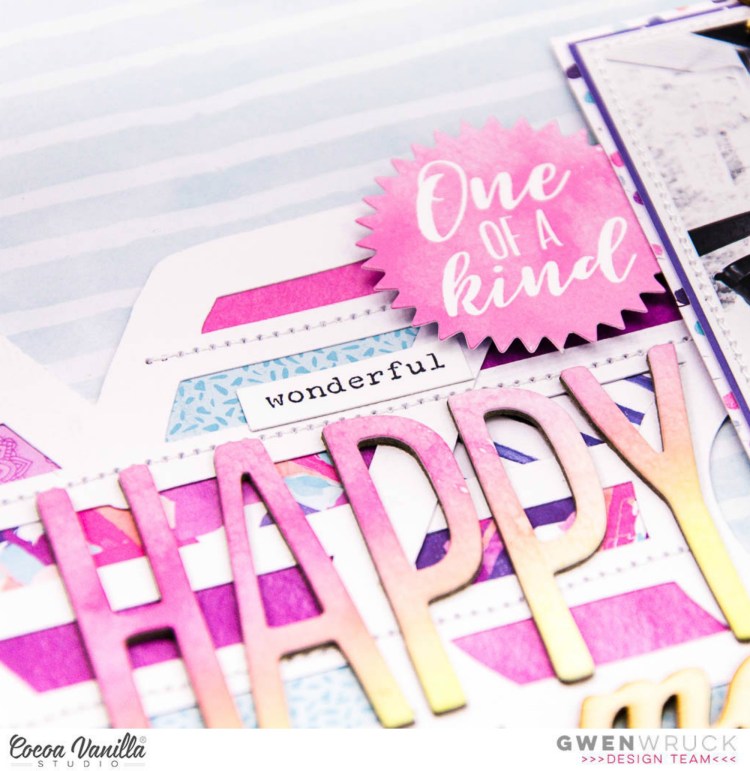
I love working with paper pads, I love that the prints in them are smaller than those on the 12×12 papers and they are a really economical way of getting every paper in a collection.  They are perfect for backing cut files as well.  Today I’m working with the “XO” from the Colour Me Happy Cut Files.  I’ve just cut the ‘X’ out twice to make my feature “XOX”.

I began by flicking through the Bohemian Dream Paper Pad to find 4 or 5 patterns to work with.  I’ve gone with one in a mint tone, two in a mauve tone and a white and dark navy/purple stripe.  I’d never have chosen all of these patterns for one layout normally, however, using them in small pieces, in their smaller design creates a really stunning effect.  I simply cut strips out of each design and mixed and matched them to back the cut file.

Once the cut file was done, I went about choosing the background.  I didn’t want to go my usual white for this one, I really wanted the page to be bright and fun, however, anything too bright just competed with my new backed cut file.  I decided on the ‘Treasure‘ paper from the ‘More Than Words’ collection.  It’s the perfect shade of muted green to coordinate with the mint in the cut file and the horizontal stripes fit in with the design of the cut file leading your eye across the page.

With that decided, I locked in the position of the cut file element and added some stitching.  I also went about matting my photo using more paper from the paper pad.  I’ve chosen 3 more designs for this still in those same tones.  That’s 8 different pattern papers all on one layout!!!  I added some more stitching and positioned on the page.

It was now time for some embellishing!  I began by making my title “Happy Memories”.  The “Happy” chipboard piece is from the Chipboard Accent Stickers from the Bohemian Dream collection and the “memories” is from the Colour Me Happy Wood Veneer Words. I’ve also added in a chipboard butterfly/moth, and heart from the Chipboard Accent Stickers.  The “One of a kind” Sticker is from the  Accessory Stickers from the Bohemian Dream collection as well.  I then found the sentiment “You Make My Heart Sing” from the Wild At Heart Accent Stickers and added that as well as some typed sentiments from the Wild At Heart Accessory Stickers.

I’ve fussy cut out two butterflies from another paper in the paper pad and added them onto the page as well as a couple of pieces from the Ephemera pack. At this point, I decided I needed one more little pop of wood veneer to balance the page out and chose the Life is Beautiful Wood Veneer “Always” Wood Veneer piece, it was a perfect size and works as a sub-title (Always Love You).  At this point, I called it done 🙂

Thanks for popping by today, I’m really happy with how colourful this one is.  The papers all worked together so well.  I hope you’ll give something like this a go;  It’s a great way to use those paper pads (or paper scraps) you have in your stash.

Until next time,

LOVELY | CUT TO YOU

Hi Creative Friends,

I’m back today to share my latest creation using my new CUT to YOU Cut files and this one has all of the colours!!  I am loving all of the rainbow projects I’m seeing of late and am not sure if it’s #trending but I just love them and was so keen to jump on board!  This one is of Miss C quite a few years ago now when she did Ballet.  She not a fan of it now, but I still love looking at these pics of her in her sweet tiara and tutu.


I’ve used the background cut file “Rows of Bows” as my starting point and kept it white because I had a very bright plan!   I then went about digging through my smallest paper scraps to find some in lots of fun colours.

Initially, I was going to do this as all the colours of the rainbow… but I ran into a couple of problems, one, there were two extra rows after I had one row of the each of the seven colours and two, I couldn’t find 4 different pieces of purple pattern paper (and I knew embellishments would be an issue too).  So… long story short, I decided to do just some of the colours of the rainbow instead.  Starting with light and dark pink, orange and yellow, and then moving to the greens and blues.  It still gives the look of a rainbow without technically being one.

Once I had backed each row of the file with my paper scraps I positioned it onto my background.  I went with the Bazzill Marshmallow cardstock for this one as I knew I wanted to add in my paint stripes.  I simply added a stripe using a wide brush of the Colour Blast Shimmer sprays to coordinate with the colours in the bows.  It was a simple touch but really made a difference to how the cut file looked against the background.  It really helped it pop off the page.

Next, it was time to add my photo and title which I positioned towards the bottom of the page.  I then went about finding a stack of bits and pieces from my stash to layer colour on colour to embellish.  I highly recommend this for all those bits and pieces you only have one of.  I can sometimes struggle to use these up as I prefer to duplicate elements on my page.   This technique works because even though the elements are different, the colour helps them to fit together.

Here you can see the beautiful painted background poking through the file… definitely going to do this technique again, that’s for sure.


I just love love love how this turned out, and anyone with some paper scraps and a few bottles of mist can do it!

Remember too, all of my designs are available as Downloadable files as well as, Custom Cut files for those ladies who don’t own a Silhouette machine.  I will personally cut them for you at HQ and ship anywhere in AUS/NZ.  Visit the website www.createdbygwen.com.au for more info or pop me a message.

Until next time,

LIVE COLOURFULLY | CUT TO YOU

Hi Creative Friends,

Here today to share my latest creation using my new CUT to YOU Cut files! This photo was taken on Mothers day this year and I have been itching to scrap it, I just love it so much.  It features my mum, of course, my sister and my little Miss.  My mum rarely smiles in photos because she is really not a fan of having her picture taken but we were all just mucking around and it was so nice to get this more natural shot of her.

For this project, I began with one of my favourites, the ‘Bouquet’ Custom cut file, yes, this is the exact file you will receive if you are one of my Custom cut ladies who don’t own a Silhouette machine.  I’ve purposely designed and cut this one to be a large feature on the page.

This cut file also has a lot of white space designed in it with the idea that you can add lots of beautiful mixed media to it.  I began by pulling out all of my Distress Oxides, I have a few of these now and love love love them!  Of course, I have all the pretty colours like Picked Raspberry and Worn Lipstick, Fossilized Amber and Shaded Lilac and I get them all at The Stampers Hut, my local scrapbook store.  I simply pressed the ink pads onto my messy mat and then spritzed with water.  I then lightly spritzed the cut file and then pressed it into the inks.  I did not use gesso at all as I knew I wasn’t going to do layers and layers of mixed media, but would definitely recommend that if you really want to get messy 🙂

Next, I worked on my background.  I used the packaging technique here and also added a stack of splatters.  I’ve used Bazzill Marshmallow cardstock for this to help prevent that nasty warping.  It was now time to back the cut file.  I’ve used lots of papers from my stash for this.  I just love how cut files allow you to use up paper scraps and turn them into something really beautiful!  Next, I positioned my cut file onto my background and glued down with some Scotch Quick Dry adhesive. I purposely left some of the edges for added dimension and interest.  I love how they slightly lift off the page.

At this point the page was really coming together, all I had left to do was mount my photo in more paper scraps, and add some simple embellishments.  I’ve gone with florals that mimic the floral shapes in the cut file to bring everything together, a title and a few other little bits and pieces and that was the page done!

I just love love love how this turned out, those oxides combined with the cut file for me was the perfect fit for this fun photo and it’s so fun to be able to work with a product I’ve designed and see it come to life on a page.

Remember too, all of my designs are available as Downloadable files as well as, Custom Cut files for those ladies who don’t own a Silhouette machine.  I will personally cut them for you at HQ and ship anywhere in AUS/NZ.  Visit the website www.createdbygwen.com.au for more info – Release night is this Friday (tomorrow) 6th July at 7pm.

Until next time,

LOVE THIS for THROW BACK THURSDAY | MIXED | GWEN WRUCK

Hi Creative Friends,

Here today to share my latest Cocoa Vanilla Studios project for a special feature “Throwback Thursday”.  My assignment for today’s layout was to dig deep into my stash and do a little stash busting.  I love challenges like these because if I use up my stash, I can get all the new things!

The oldest piece of Cocoa Vanilla I managed to find is this wood chevron paper from the Hello Lovely collection ‘Confetti‘.  So the design for the page started with that.  I kept digging and also found half a sheet of the Free Spirit ‘Dreamy’ paper which had very pretty soft tones that could coordinate.  Both of these collections are from 2015 and they still have a very fresh feel to them, which really says a lot about how well they are designed!  I then got to thinking about how I could stretch these limited supplies and decided on using a cut file.  I am a big fan of the look of cut files on my pages and this is one I have designed myself.  It is available at my CUT to YOU store (www.createdbygwen.com.au) from tomorrow!


I used the light side of the  Free Spirit ‘Dreamy’ paper for the larger flowers and the B side of this same paper for the smaller flowers. Because I had mat my photo first, I was able to use lots of little pieces here and there to back the file helping me to really stretch and use up every inch of that paper.

The main elements in the design were now locked in, so it was just a matter of finding some pretty embellishments to go with it.  I started by looking for some wood elements as I thought they would go really well with my background paper.  I went straight to the Endless Summer collection as I knew it had tones that would go with what I had already and found some cute Wood Veneers as well as some Puffy Stickers.

I also found a Die Cut Ephemera piece from this collection and teamed it with another wood element, these are Wood Veneer Words from the Colour Me Happy Collection to create my title.  There were also some other cute elements in this pack so I’ve added those as well including photo corners and a die cut that says “Enjoy the little things”.  I’ve simply made 3 small embellishment clusters that lead your eye around the page following the lines of the cut file in the background.

To finish the page off, I’ve added in some butterflies and hearts from the Sticker Sheet from the Endless Summer collection as well as a pretty pink Flair badge.

Using the cut file really helped this page come together and I love how it turned out.  I love the soft tones of my black and white photo and how the cut file stands out from the background paper and frames the photo.  It really was fun to go digging through all of my Cocoa Vanilla products and I’ll certainly be doing this again!

If you would like to hear more about CUT to YOU cut files, be sure to sign up to our newsletter.  You don’t need a Silhouette to create with my cut file designs, so jump onto the website www.createdbygwen.com.au and sign up now!

Until next time,

error: